
A: Most thermal models do not use conventional ink cartridges or toner. Direct thermal equipment uses heat sensitive media, while thermal transfer equipment uses a ribbon.
A warehouse worker needs to replace a shipping label just before a truck leaves. A retailer receives new stock that needs identification, while an asset manager needs labels that stay readable on equipment. These tasks affect the wider workflow.
For IT teams and procurement managers, choosing a barcode printer means looking beyond the hardware price. Media, printing method, volume, resolution, connectivity, software compatibility and supply costs all need to fit the job.
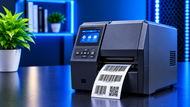
A barcode printer produces machine readable labels, tags, tickets and related media. It uses thermal printheads, media handling and label sensing rather than general document printing. Depending on the model, it may support direct thermal, thermal transfer or both with speed, resolution and interfaces varying by configuration.
Common outputs include product, inventory, shipping and identification labels. Some models also support tags, tickets or continuous stock. The format should match the job.
What is a barcode printer and how does it work? The process starts with barcode data from an inventory, POS, shipping or label design system. Software places that information into a label layout and sends print instructions to the device.
The printhead then creates the image on the media. Direct thermal printing uses heat sensitive material. Thermal transfer uses heat to move a coating from a ribbon onto the label. The output can contain barcodes, text, numbers, graphics or a combination.
A purpose built label printer is designed for repeatable output on specific media sizes and formats. Sensors help detect label gaps or marks, while calibration and print settings help maintain positioning.
Readability also depends on media, barcode design, darkness, alignment, calibration and printhead condition.
The choice usually comes down to label life, environment, media and working requirements.
Direct Thermal Printers create an image directly on heat sensitive media, so there is no ribbon to manage. This can suit shipping labels, temporary identification, receipts and other short term applications.
Some direct thermal media are more sensitive to heat, light and abrasion, so label life depends on the material and environment.
Thermal Transfer Printers use a ribbon with heat transferring its coating onto compatible media. The method can support strong output on suitable paper and synthetic materials.
It can fit labels that need to remain readable longer or face demanding conditions. Strength depends on the ribbon, media, environment and settings. For a direct thermal vs thermal transfer barcode printer decision, compare label life and consumable requirements.
Desktop Barcode Printers are compact and usually suited to light or moderate workloads at fixed workstations such as offices, retail counters, inventory desks and shipping stations.
For example, Zebra's ZD421 is available in direct thermal and thermal transfer configurations with 203 or 300 dpi options. Speed and connectivity depend on configuration.
Industrial Barcode Printers are the future for heavier workloads and demanding environments such as warehouses, distribution centers and manufacturing facilities. They are mostly selected when the process requires more robust hardware and sustained output.
Industrial models vary considerably. Zebra's ZT411 for example, supports direct thermal and thermal transfer printing, 203, 300 and 600 dpi configurations, with optional wired and wireless connectivity. Check the specification for the selected model.
Mobile printers support on demand labeling away from a fixed desk, including warehouse, delivery, retail and field workflows.
A wireless barcode printer can help where workers move between locations, but battery life, media size, speed, device compatibility and working conditions also matter.
Performance should be judged against the actual workload.
Print resolution is measured in dots per inch (dpi). Higher resolution can help with small labels, fine text, graphics or compact barcode designs, but more resolution is not automatically needed for every application.
Printing speed affects output. Published maximums can vary with resolution, media, print format and model. Current desktop and industrial ranges publish different speed and resolution combinations.
Print width should match the label format. Print volume and duty cycle also matter because occasional office use differs from a busy packing line.
Barcode readability should remain a priority. If scans fail, the cause may involve media, darkness, alignment, calibration or printhead condition rather than the printer category itself.
Printer and media should be considered together because unsuitable supplies can create problems even when the hardware is capable.
Paper is common for product, inventory and shipping applications. A barcode label printer for paper labels can be suitable when unusual resistance to moisture, chemicals or abrasion is not required.
Synthetic materials may be better suited to demanding environments, while specialty media serves specific applications. Compatibility depends on the printer, printing method and media specifications.
Before ordering barcode labels, check size, adhesive, strength and environmental resistance. Shelf labels may differ from equipment labels exposed to heat or moisture.
Barcode label rolls also need to match supported dimensions, sensing methods and media formats to help stop feeding and alignment problems.
USB provides a direct connection to a computer, while Ethernet supports wired network printing. Wi-Fi provides wireless network access and Bluetooth can connect compatible devices over a short range.
Available interfaces vary by model. Current platforms can offer combinations of USB, Ethernet, Wi-Fi, and Bluetooth so confirm the exact configuration before purchase.
Software compatibility matters too. Check support for label design, inventory, POS, warehouse or shipping systems along with drivers, working systems and print languages.
For a wireless barcode printer for business use, also review the network setup and the devices that will send print jobs.
Retail can use labels for product identification, pricing, shelving and returns. Warehouses use them for stock, cartons, bins and locations.
Logistics processes depend on shipping and tracking labels, while manufacturers may identify products, components or work in progress items. Healthcare workflows can involve patient, specimen or asset labeling depending on the application.
Asset management can use scannable labels for computers, tools, equipment and other property. The required hardware and media should follow the workflow and environment.
The initial equipment price is only part of ownership cost. Also calculate labels, media, ribbons where required, printheads, maintenance and reprints.
Direct thermal printing does not need a ribbon, while thermal transfer adds ribbon consumption. Label size, material, print volume and supply pricing can also change cost per label.
Compare total cost over the expected service period, not just the purchase price.
For broader printer selection factors, see the Printer Buying Guide 2026: What to Look for When Buying a Printer.
For low to moderate printing, a desktop model can suit a fixed workplace. High volume processes may need industrial equipment, while mobile units support workers who print away from a desk.
Direct thermal printing can simplify short term labeling because it does not require a ribbon. Thermal transfer may fit applications where the printed image needs greater strength with suitable media.
Specialized environments call for attention to material, adhesive, temperature, moisture, chemicals, abrasion and label life.
Choosing a barcode printer in 2026 starts with the workflow. A retail counter, warehouse packing line, manufacturing floor and mobile process can need different combinations of speed, media support, durability and connectivity.
Review the printing method, printer type, workload, label requirements, software environment and working costs together. That gives IT and procurement teams a clearer basis for selecting equipment that fits the job without paying for features the workflow does not need.
A: Most thermal models do not use conventional ink cartridges or toner. Direct thermal equipment uses heat sensitive media, while thermal transfer equipment uses a ribbon.
A: Depending on the model, they can support paper, synthetic labels, tags, tickets, continuous media and specialty formats. Confirm compatible supplies in the manufacturer's specifications.
A: Industrial Barcode Printers are usually intended for higher volume workloads and demanding environments. The appropriate model still depends on speed, duty cycle, media format and working conditions.
A: Yes. They can fit in with inventory, POS, warehouse, shipping and label design systems when the required drivers, interfaces and print languages are supported.
A: Yes. They can support on demand labeling in warehouses, retail, delivery and field workflows. Connectivity, battery life, media size and workload should match the application.
A: Compare media, ribbons where required, maintenance, printheads and reprints along with the hardware price. Matching the printing method and media to the application can also reduce unnecessary consumable costs.
A: There is no single lifetime for every label. Direct thermal media can be more sensitive to heat, light and abrasion, while thermal transfer output can provide greater durability with suitable media and ribbon. Actual life depends on the material and environment.

Posted Sep 07, 2023

Posted Sep 07, 2023

Posted Sep 06, 2023
Posted Sep 05, 2023
Posted Sep 01, 2023

Posted Aug 30, 2023

Posted Aug 30, 2023