
A: Start by reviewing the number of sites, network connections, traffic levels, required port speeds, rack space, power, cooling, and future expansion plans. Then check which chassis and modules support those requirements together.
Enterprise networks rarely stay the same for long. A company may start with a few offices and a modest number of network connections, then add new locations, users, applications, cloud services, and higher-speed links over time. The router hardware needs to handle those changes without forcing the business to replace its entire network setup.
This is where Router Chassis and Modules become important. A modular router lets an organization select a chassis that fits its network and add the modules needed for its specific connections and functions.
The right choice starts with the network itself. Traffic levels, port types, growth plans, available rack space, power, cooling, management needs, and compatibility all affect the final hardware decision.
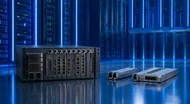
A Router Chassis and modules are the main physical frame that holds the different parts of a modular router. Depending on the system, the chassis can contain routing processors, line cards, switching or fabric components, power supplies, and cooling units.
Router Modules add the interfaces and functions the network needs. A module may provide a group of network ports, support a certain connection speed, or handle a specific type of network service.
The exact design differs between router families. Some enterprise systems support several chassis sizes and a shared range of line cards. Others place strict limits on which modules can work with particular chassis or fabric components.
This makes compatibility a major part of hardware selection. A module should never be chosen only because its port count or speed looks suitable. The module must also work with the selected chassis, power system, switching hardware, and software.
Before choosing hardware, define what the network needs to accomplish.
Start with the number of sites, users, connections, and services the router will support. A head office with several branch connections has different requirements from a central data center carrying traffic between many locations.
Next, review current traffic. Look at the types of connections in use, their speeds, and the amount of traffic they carry during busy periods. A router that handles today's traffic comfortably may become a poor choice if the business expects several high-speed connections within the next few years.
The physical environment also matters. Check rack space, power availability, cooling capacity, cable routes, and the location of the equipment. Large modular systems can require several power supplies and dedicated cooling arrangements. Manufacturer documentation shows that chassis power requirements can change with the number and type of installed modules.
Write these requirements down before comparing hardware. This gives the IT team a clear basis for choosing the chassis and modules.
Router hardware sits at an important point in enterprise communications. A poor hardware choice can create limits that become difficult and expensive to fix later.
For example, buying a chassis with too few available slots can leave little room for new interfaces. Choosing modules without checking their power requirements can create problems in a rack that already has limited power capacity. Selecting hardware that cannot support the required connection speeds can also force an early replacement.
Good hardware planning looks beyond the initial installation. The goal is to choose equipment that fits the network now while leaving sensible room for expected changes.
This does not mean buying the largest system available. Extra capacity that the business will never use can increase the purchase price, power use, rack requirements, and maintenance burden.
The router should fit the wider Enterprise Router Infrastructure, not operate as an isolated piece of equipment.
Check how the new hardware will connect with existing switches, firewalls, WAN links, data centers, branch networks, and monitoring systems. Port types and connection speeds need to match the equipment at the other end of each link.
Multi-location businesses also need consistency. Using compatible chassis and module families across several sites can make spare parts, training, maintenance, and replacement work easier.
A central network may need a larger chassis with more interface capacity, while a branch office may need a smaller system with fewer connections. The hardware does not need to be identical at every location. It needs to follow a consistent plan.
A small enterprise may not need a large chassis with many empty slots. The better approach is to identify the required interfaces and select a system that provides enough capacity for current operations plus a reasonable amount of room for expected additions.
Cost also matters. Avoid paying for unused modules, excessive power capacity, or features that the network does not need.
Medium-sized networks normally need a closer balance between current capacity and future expansion. The business may have several offices, different WAN connections, higher traffic levels, and more demanding applications.
A modular system can help here because the organization can add interface modules as requirements change instead of replacing the whole router.
Large deployments need detailed hardware planning. The network may require many high-speed interfaces, multiple chassis components, redundant power, backup routing hardware, and additional cooling capacity.
Redundancy needs special attention. Large modular platforms can use separate power sources, backup control components, and multiple fabric or switching components to reduce the effect of hardware failures. Current modular router designs from major manufacturers show how these systems can use redundant route processors, power supplies, fans, and fabric components.
Count the sites, users, links, and devices that will depend on the router. The chassis should provide enough physical capacity for the planned deployment.
Review current traffic and expected traffic increases. Port speed alone does not tell the whole story. The router's forwarding capacity, module capacity, and internal switching design also need to match the workload.
Check how many empty slots remain after the first installation. Think about which new connections the business may add later.
A chassis with spare capacity can make future additions easier, but unused capacity should still have a practical reason behind it.
Check every module against the exact chassis model and hardware generation. Some line cards work only with specific switching or fabric components. Juniper documentation, for example, lists line cards that require matching switch interface boards and states that certain combinations cannot be mixed within the same chassis.
Also check software support, firmware requirements, power limits, cooling requirements, and supported optics or interfaces.
Think about how the IT team will monitor, configure, maintain, and replace the hardware.
Field-replaceable components can reduce downtime during hardware work. Some current modular routers support hot replacement for selected components, but the exact rules vary by platform.
Modular Networking Systems give enterprises more control over how their hardware develops.
Instead of purchasing a completely new router whenever the network needs another group of interfaces, an organization may be able to add a compatible module to the existing chassis.
This approach can also help standardize equipment. An IT team can establish approved chassis and module combinations and use them across different parts of the organization.
The main benefit comes from planning. Modular hardware only provides useful flexibility when the chassis, modules, power system, and software support future additions.
The purchase price of a chassis is only part of the cost.
Include the price of modules, power supplies, cooling components, optics, cables, spare parts, licenses where applicable, installation, maintenance, and future additions.
Power consumption also deserves attention. A larger chassis with several high-capacity modules may require more power and cooling than a smaller deployment.
A low initial price can become expensive if the system has to be replaced early. At the same time, buying far more capacity than the business can reasonably use can tie up money without providing a useful return.
The right budget plan matches the hardware to real network requirements and known expansion plans.
One common mistake is choosing hardware based only on current requirements. Enterprise networks change, and a chassis with no room for additional modules can become restrictive.
Another mistake is ignoring compatibility. A module may have the right ports and speed but still fail to work with a particular chassis or fabric system.
Some teams also overlook power and cooling. High-capacity modules can change the power and cooling requirements of the complete system.
Buying the biggest chassis available can be another poor choice. Size alone does not make a router suitable for a deployment.
Finally, avoid treating the router as a standalone purchase. The hardware must fit the switches, WAN connections, data center equipment, security devices, software, and management systems already used by the organization.
Start by documenting the network requirements before looking at specific hardware.
Create a clear record of current ports, connection speeds, traffic levels, rack space, power availability, cooling, and planned additions.
Then define approved chassis and module combinations. This can reduce confusion when the organization adds another site or replaces a failed component.
Keep a record of installed modules and available slots at every location. This gives the IT team a clear picture of existing capacity before ordering new equipment.
For larger deployments, also plan for hardware failure. Redundant power and control components can help keep services running when a component fails. Some modular systems are designed around separate power feeds and backup components for this purpose.
Enterprise hardware planning is moving toward greater flexibility. Networks now carry traffic from offices, data centers, cloud services, remote users, and other connected environments.
Higher-speed interfaces are also becoming more common in large network deployments. Current modular platforms support interface speeds that range from traditional enterprise connections to 100G, 400G, and higher-speed systems.
This makes modular hardware planning more important. IT teams need to look at the type of interfaces they need today and the connection speeds they may require later.
Hardware monitoring and automation are also becoming more closely tied to network management. Modern platforms can provide detailed hardware status information and support software-based management functions, giving IT teams better visibility into the condition of the network equipment.
Router selection makes more sense when you understand how routers fit into the wider network. Our Role of Bridges and Routers in Modern Enterprise Networking: A 2026 Guide explains how these two types of networking hardware handle traffic and where they fit within modern enterprise infrastructure. It provides useful background before you make decisions about Router Chassis and Modules.
Choosing Router Chassis and Modules requires more than comparing port counts and prices. The chassis needs to match the size of the network, while each module must support the required interfaces, speeds, software, power system, and hardware architecture.
Start with the network requirements. Check current traffic, future additions, physical space, power, cooling, compatibility, management needs, and redundancy. Then compare hardware against those requirements.
A well-planned modular system can give an enterprise room to add connections and capacity without replacing the entire router platform. The best router chassis and modules for enterprise deployments are the ones that fit the actual infrastructure plan and leave practical room for the changes the business expects.
A: Start by reviewing the number of sites, network connections, traffic levels, required port speeds, rack space, power, cooling, and future expansion plans. Then check which chassis and modules support those requirements together.
A: Organizations should review network size, traffic demand, interface types, connection speeds, available chassis slots, hardware compatibility, power, cooling, software support, management requirements, and future additions.
A: A network can grow after the initial installation. A chassis with suitable spare capacity can allow an organization to add compatible modules instead of replacing the complete router when new connections are required.
A: Modular router systems allow organizations to add certain hardware components as network requirements change. This can make it easier to add interfaces, increase connection capacity, or adapt the router to new deployment needs.
A: Yes. Many modular systems are designed to support additional line cards and other components. The exact expansion options depend on the chassis model, supported modules, power capacity, cooling, software, and internal hardware architecture. Checking manufacturer compatibility information before expansion is important.

Posted Sep 07, 2023

Posted Sep 07, 2023

Posted Sep 06, 2023

Posted Sep 05, 2023

Posted Sep 01, 2023

Posted Aug 30, 2023

Posted Aug 30, 2023