
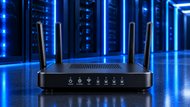
A: Network routers connect separate networks and direct data packets to the right destination. They allow employees, devices, applications, branches, and external services to communicate across different network environments.
A business network can have fast computers, cloud applications, phones, servers, wireless devices, and several offices. None of that works well when data cannot move between the right networks at the right time.
This is where Network Routers come in.
A router connects different IP networks and decides where data packets should go. It uses routing information to select a path between networks, allowing devices and services in different parts of a business to communicate.
For a growing business, that job becomes more important as the number of users, devices, applications, and locations increases. The right router can help a company keep communication steady while its network grows.
Business connectivity covers much more than access to the internet.
Employees may need to reach file servers, cloud applications, internal systems, printers, voice services, databases, and online tools throughout the workday. A business with several branches may also need its teams to communicate with systems located at another office or data centre.
This makes the network itself part of daily business operations.
Routers in networking sit between separate networks and direct traffic between them. A router examines packet information and uses its routing table to decide where each packet should go. It can connect a local office network to a wider network, connect branch locations, or provide a path to external services.
Good connectivity also depends on handling traffic properly. Business applications do not all have the same needs. Voice calls and video meetings, for example, can suffer when traffic faces delay or congestion. Business routers may support Quality of Service settings that give certain types of traffic higher priority.
That makes the router an active part of business communication rather than just a device sitting between the office and the internet.
As a company grows, its network rarely stays the same.
A small office might start with a few employees and a handful of connected devices. Later, it may add staff, IP phones, wireless equipment, servers, cloud systems, cameras, guest access, or another branch. Each addition creates more traffic and more paths that the network must handle.
This is where how network routers support scalable business networks becomes clear.
Routers can separate different networks and manage traffic between them. This helps businesses organise connectivity instead of placing every device on one large network.
A company may, for example, keep office users, guest devices, servers, and other systems on different network segments while allowing only the required traffic between them.
Larger environments can also use routing protocols that help routers learn and maintain routes between multiple networks. Static routes may work well for smaller setups, while larger networks may need dynamic routing as their number of networks and connections increases.
This approach gives a business room to add users, devices, and locations without redesigning the entire network every time something changes.
An Enterprise Router is built for workloads that go beyond the needs of a basic home connection.
Large organisations may have several offices, remote users, cloud services, voice systems, video traffic, and internal applications running at the same time. Their routers may need to manage multiple links, routing policies, VPN connections, traffic priorities, and security controls.
Enterprise networking routers can also support communication between branch offices and central systems. VPN functions can create protected connections between locations or between remote users and business networks.
Some enterprise routing platforms combine routing with features such as VPN, firewall controls, access rules, traffic management, and failover.
That matters when communication has to continue across several parts of an organisation.
Routers can also help control how different applications use available network capacity. For example, voice traffic may need better treatment than a large file download. Quality of Service settings can help give priority to traffic that needs more consistent delivery.
Businesses often operate across more than one physical space. A company may have a head office, branch offices, warehouses, remote teams, or staff working from home.
Routers help connect those separate networks.
A branch office can communicate with central business systems through routed connections. Teams in different locations can access shared services when the network is designed to allow that traffic. A business can also use VPN-based connections to protect traffic between remote locations or users.
This can reduce the need for separate isolated systems at each location.
Reliable routing also helps cloud-based work. Staff may use cloud storage, hosted applications, online communication tools, and remote business platforms throughout the day. The router provides a path between local devices and those external services.
When routing is poorly designed, users may see slow application access, failed connections, or unnecessary traffic congestion. A well-planned router setup gives each part of the network a clear path to the resources it needs.
A growing company needs network equipment that can handle more than its current workload.
Replacing a router every time the business adds a small number of users can create extra cost, downtime, and configuration work. Choosing equipment with suitable processing capacity, interfaces, routing support, security features, and management options gives the business more room to grow.
This does not mean every company needs the largest router available.
The right choice depends on the number of connected devices, WAN connections, expected traffic, locations, applications, security needs, and future plans. Businesses should consider both current demand and reasonable growth when choosing network routers for growing business infrastructure.
Port availability can also matter. A router may need to connect to different WAN services, LAN networks, VPN links, or other network equipment. In larger installations, modular router designs can provide additional flexibility as requirements change.
The goal is to expand the network without creating a constant cycle of major hardware changes.
Connectivity without proper security creates another problem.
A router sits at an important point in the flow of business traffic. Its configuration can influence which networks can communicate, which services are reachable, and how external connections enter the environment.
Router security can include access control rules, secure management, VPN protection, firewall functions, traffic restrictions, firmware updates, and controlled administrative access. Some business routers combine these features with routing functions in a single platform.
A secure network router also needs proper configuration. Strong administrator credentials matter. Unnecessary services should not remain exposed. Firmware should be kept current according to the vendor's support guidance. Remote management should be restricted to approved access paths.
Network separation also plays a security role. A guest network should not have unrestricted access to internal business systems. Sensitive resources may need to sit on separate network segments with traffic rules controlling what can pass between them.
NIST has highlighted the importance of router security because routers can affect the protection, integrity, and availability of connected networks.
Security should be part of the router selection process from the start, not something added after a network problem occurs.
The value of Network Routers becomes clear when you look at the tasks they handle every day.
They give different networks a way to communicate. They direct packets toward their destinations. They can separate traffic between network segments. They can support VPN connections between offices and remote users.
They can apply traffic rules and, on suitable models, give priority to applications that depend on consistent network performance.
Routers also give IT teams more control over a growing network.
Instead of treating the business network as one large connection, administrators can create clear routes between departments, locations, servers, cloud environments, and other services. This makes network expansion easier to manage.
Routing also directly affects business continuity. When employees cannot reach business applications or another office, work can stop even when the computers themselves are working properly.
Features such as redundant links, failover, and suitable routing design can help reduce the effect of a single connection failure where the chosen equipment supports them.
For businesses planning a Scalable Network Infrastructure, the router should be treated as part of the network's long-term design rather than an afterthought.
For a broader look at how routers fit into the wider hardware structure of a business network, read our Role of Bridges and Routers in Modern Enterprise Networking: A 2026 Guide.
Business networks are becoming more spread out.
Applications can sit in company data centres, private environments, public cloud platforms, branch offices, or hosted services. Employees may work from headquarters, another office, or home. That creates more paths and more traffic for network teams to manage.
Routing technology is also changing to meet these needs.
Modern business environments can use physical routers, virtual routers, VPN gateways, and software-based routing functions. Virtual routing can place routing services in cloud and virtual environments rather than tying every function to a physical appliance.
Traffic control is also becoming more application-aware. Modern WAN technologies can use policies based on application requirements, available paths, and network conditions. Current routing platforms may combine routing with security, visibility, VPN connectivity, and traffic controls.
For businesses, this means the router will remain a central part of connectivity even as network designs change. The hardware may evolve, and some routing functions may move into software, but businesses will still need clear paths, controlled access, reliable communication, and room for growth.
A business router does far more than connect an office to the internet.
It decides how data moves between networks, supports communication between locations, helps organise traffic, connects remote users, and can form an important part of the security setup.
As businesses add more employees, devices, offices, and cloud services, those functions become increasingly important.
Choosing the right Network Routers means looking beyond speed. Businesses should also consider routing capacity, interfaces, security controls, VPN support, traffic management, reliability, management features, and room for future network growth.
A well-chosen router gives the business a stronger base for everyday communication and future expansion.
A: Network routers connect separate networks and direct data packets to the right destination. They allow employees, devices, applications, branches, and external services to communicate across different network environments.
A: Routers help businesses add new networks, users, devices, and locations while keeping traffic paths organised. Larger environments can also use dynamic routing protocols to manage changing routes across multiple networks.
A: Businesses should assess routing capacity, network interfaces, VPN support, security controls, traffic management, failover options, management features, and support for the number of users and connections they expect to handle.
A: Yes. Suitable business routers can support VPN connections that allow remote users and separate business locations to connect to protected network resources.
A: Business networks rarely stay the same size. New employees, devices, applications, branches, and cloud services can increase traffic and add new connectivity requirements. A network design with room for growth reduces the need for major changes every time the business expands.
A: Routers help keep communication paths available between users, locations, and network resources. Features such as multiple links and failover can help reduce disruption when one connection becomes unavailable, depending on the router and network design.

Posted Sep 07, 2023

Posted Sep 07, 2023

Posted Sep 06, 2023

Posted Sep 05, 2023

Posted Sep 01, 2023

Posted Aug 30, 2023

Posted Aug 30, 2023