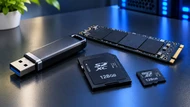
Flash Memory is storage that keeps your files after the power goes off. That single trait, called non-volatility, is why your phone still has your photos after the battery dies and why a USB stick works after you pull it out of a laptop and carry it across town. Nothing has to stay powered for the data to stay put.
You already own more Flash Memory than you probably realize. The SSD in your laptop, the SD card in a camera, the chip holding your router's firmware, the 100GB or more sitting inside a modern car running infotainment and driver assistance. Same basic technology, different packages.
2026 has made this worth understanding rather than ignoring. AI data center buildouts are eating NAND supply, and TrendForce projected NAND flash contract prices rising 55 to 60% quarter over quarter in Q1 2026, with another sharp jump forecast for Q2.
Consumer 1TB SSDs that sold near $45 in late 2025 climbed toward $90. When prices move like that, buying the right part the first time actually saves money.
Understanding Flash Memory
Flash Memory is non-volatile storage built entirely from solid-state chips. Non-volatile means the data stays written without electricity feeding it. Solid-state means there are no moving parts inside, no motors, no arms, no spinning platters.
That's the opposite of RAM (Random Access Memory), which wipes itself clean the moment the machine shuts down. RAM is a temporary workspace. Flash Memory keeps things.
You'll find it in USB drives, SSDs, SD and microSD cards, phones, tablets, consoles, and the small firmware chips soldered onto motherboards and industrial controllers.
Set it against a mechanical hard drive, and the difference is easy to picture. A hard drive spins a platter at 5,400 or 7,200 RPM with a read head hovering over it, and dropping one can wreck the head, the platter, or both.
Flash Memory has nothing to knock out of alignment, so a bumped laptop or a vibrating machine on a factory floor doesn't threaten the data the same way.
Remember: People write "Flash RAM" or "Flash RAM (Random Access Memory)" when searching, and shops sometimes label products that way. Flash RAM is not RAM. The phrase is informal shorthand for Flash Memory, and mixing the two up leads buyers to order the wrong part.
Flash Memory vs. RAM
RAM (Random Access Memory) is volatile working memory. It holds the operating system, open apps, browser tabs, and whatever you're actively editing. Cut the power and it's gone in an instant.
Flash Memory is non-volatile storage. It holds your installed software, files, photos, and firmware, and it keeps holding them through shutdowns, flat batteries, and power cuts.
Speed is where the two split hardest. A DDR5-6400 kit moves roughly 50 GB per second, while a fast PCIe 5.0 NVMe SSD peaks around 14 GB per second.
Latency tells an even sharper story: DRAM answers a request in about 80 nanoseconds, and a NAND flash read takes tens of microseconds. RAM responds hundreds of times quicker.
So they do different jobs. The CPU works out of RAM because it needs answers instantly, and Flash Memory feeds RAM and catches whatever RAM can't keep. Boot a PC and firmware stored in flash starts the machine, then the operating system is pulled off the SSD into RAM so it can run.
Neither replaces the other. Fast storage with too little RAM means constant swapping. Plenty of RAM with a tired old drive means slow boots and long load times. You need both, sized sensibly.
Every Flash Memory chip is a grid of cells, and each cell is a floating-gate transistor. Picture a tiny sealed pocket wrapped in insulation. Push electrons into that pocket, and they're trapped there with no power needed to hold them. The presence or absence of that charge is read back as a 1 or a 0.
Three operations run on those cells, and they don't behave alike:
Read is quick and gentle. It costs the cell almost nothing.
Write (programming) pushes charge into cells, one page at a time, with pages running roughly 4KB to 16KB.
Erase clears charge, and it can only happen across a whole block, which packs hundreds of pages together into several megabytes.
That last point drives the whole design. Flash can't overwrite a file in place the way a hard drive does. To change data, the controller writes the new version somewhere fresh, marks the old copy dead, and erases that block later once it's full of dead pages. Every program and erase pass wears the cell's insulation down slightly.
Wear leveling is the fix. The controller spreads writes across the whole chip so no single block gets hammered while the rest sit idle. Add over-provisioning and TRIM, and a modern drive lasts far longer than the raw cell rating suggests.
Endurance is measured in Program/Erase (P/E) cycles, and it drops as manufacturers squeeze more bits into each cell:
Cell type
Bits per cell
Rough P/E cycles
Best suited to
SLC
1
50,000 to 100,000
Industrial, write-heavy logging
pSLC
1 (TLC silicon run in 1-bit mode)
20,000 to 40,000
Embedded and long-life devices
MLC
2
3,000 to 10,000
Legacy enterprise, niche industrial
3D TLC
3
1,000 to 3,000
Mainstream laptops, desktops, servers
QLC
4
around 1,000
Archives, media libraries, read-heavy storage
This is why write endurance sits on the spec sheet as TBW (terabytes written). Many 1TB consumer TLC drives carry ratings between 300 and 600 TBW, which is more writing than most people manage in a decade. Buy QLC for a write-heavy database, and you'll burn through it far sooner.
The Types of Flash Memory
NOR Flash Memory: Fast Reads, Direct Execution
NOR Flash lets the processor read any single byte directly, in any order. That random access ability allows Execute in Place (XIP), where code runs straight out of the memory chip with no copying step first.
It's the reason NOR Flash holds BIOS and UEFI firmware, microcontroller code, and boot code in industrial and automotive electronics. The machine needs instructions the instant it wakes up, before RAM is even ready.
The trade-off is write and erase speed. NOR is slower on both and far less dense, so cost per bit runs much higher than NAND, and capacities sit in megabits to a couple of gigabits rather than terabytes.
For anyone sourcing embedded boards, industrial PCs, or automotive-grade hardware, NOR Flash is what shows up on the bill of materials.
NAND Flash Memory: High Density, High Volume
NAND Flash wires cells in series and stacks them vertically, which packs far more data into the same silicon.
SK Hynix moved 321-layer QLC NAND at 2 terabits per die into mass production, and SanDisk began shipping UltraQLC enterprise SSDs at 128TB and 256TB in the first half of 2026.
This is the flash inside almost everything you buy by capacity: USB drives, SSDs, SD cards, phones, and enterprise storage arrays. Writes and erases run quicker than NOR, which suits large transfers and heavy workloads.
The catch is that NAND can't do Execute in Place. Code has to be copied into RAM before the CPU runs it, so most systems keep a small NOR chip for boot and a large NAND drive for everything else.
Cost per gigabyte is where NAND wins outright, and it's why data centers facing a nearline hard drive shortage are moving to high-capacity QLC SSDs instead.
What Are the Advantages of Flash Memory?
Speed: An NVMe SSD reads and writes many times faster than a mechanical drive, and random access is near-instant because there's no head to move.
Durability: No moving parts means shock and vibration don't cause the failures they cause in hard drives. That matters in laptops, vehicles, and factory equipment.
Low power draw: Flash sips power compared with spinning a platter, which stretches battery life in phones, tablets, and portable gear.
Compact size: A microSD card the size of a fingernail holds what once needed a desktop drive bay.
Reliability: Data survives an unexpected power loss, and no motor or bearing is waiting to seize.
Portability: Light, small, and tough enough to live in a pocket, which is what makes USB drives and SD cards practical.
Conclusion
Flash Memory is non-volatile, fast, physically robust, and comes in types that behave very differently. NOR reads bytes directly and runs firmware. NAND stores bulk data cheaply. SLC survives heavy writing, TLC covers most real work, QLC gives you capacity for the money.
Knowing which is which changes what you buy. It tells you whether a drive suits a write-heavy server or a media archive, and whether a cheap high-capacity SSD is a bargain or a mistake for your workload.
With supply tight and prices climbing through 2026, matching the part to the job is worth more than it was two years ago. Newtown Spares stocks Flash Memory products and compatible IT hardware for home users and business buyers, from SSDs and memory cards to system memory and spares.
Browse the Flash Memory category, or get in touch if you want a compatibility check before you order.
Frequently Asked Questions
A: Because it keeps data without power, survives being dropped, draws very little energy, and fits into small spaces. Those four traits together suit phones, laptops, cameras, cars, and servers better than any mechanical alternative, which is why flash replaced hard drives in nearly every portable device.
A: Flash Memory is non-volatile long-term storage that keeps data after shutdown. RAM (Random Access Memory) is volatile working memory that clears the moment power stops. Flash holds your files and firmware. RAM holds whatever the processor is working on right now. A computer needs both.
A: No. RAM is far quicker. DRAM responds in roughly 80 nanoseconds, while a NAND flash read takes tens of microseconds, so RAM answers hundreds of times faster. Flash trades that raw speed for the ability to keep data without power.
A: It isn't a fair comparison, because an SSD is a device built from flash memory. A solid-state drive packages NAND Flash chips with a controller and a standard interface such as SATA or NVMe. Asking which is better is like asking whether flour or bread is better.
A: Cells wear out. Each one survives a limited number of program and erase cycles, and data can only be erased in whole blocks rather than edited in place, which adds extra internal writing. Long-term unpowered retention is limited too, and JEDEC's standard asks a client SSD to hold data for one year unpowered at the end of its rated life, with enterprise drives rated for three months.
A: Yes. Tell us the make and model of your system and what you use it for, and we'll point you to Flash Memory and storage options that fit the interface, form factor, and workload, so you don't end up with a part that physically fits but underperforms.