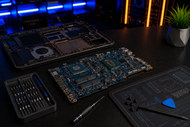
Laptop motherboards hold nearly every part your machine needs to run. The processor, memory, storage controller, graphics, sound chip, Wi-Fi card and every port sit on this board or plug straight into it.
Desktop owners swap parts freely. Laptop owners don't, because each board gets built for one chassis and one model line.
So this single part decides your RAM speed ceiling, your storage type, your display output and how much heat the system takes before it throttles. The CPU sits at the centre and now carries the memory controller, the PCIe controller and the graphics engine in its own package.
Copper traces run from there to the RAM, to the M.2 slot holding your SSD, and to the discrete GPU if the laptop has one. The chipset manages the slower traffic around all of that.
Understand the Core Structure of a Laptop Motherboard
Processor design in laptop motherboards
Laptop processors sit soldered to the board in a BGA package, with hundreds of tiny solder balls under the chip instead of a removable socket.
The board and the processor live and die together. A board built for Intel's Core Ultra Series 3, launched in January 2026 on the 18A process, cannot take an AMD Ryzen AI 400 chip, and the reverse holds too.
Chipset and system control
The laptop motherboard chipset controls everything the CPU doesn't handle directly: USB lanes, spare PCIe paths, SATA links, audio routing, and the low-speed connections for the keyboard and touchpad.
Its role in system performance shows up as hard limits. The chipset decides how many USB ports run at full speed, whether your second M.2 slot gets four PCIe lanes or two, and whether the board charges over USB-C.
Explore Key Components of a Laptop Motherboard
Memory and storage system
A DDR4 laptop motherboard uses SO-DIMM slots and tops out near 3200 MT/s. A DDR5 laptop motherboard starts around 4800 MT/s and climbs well past that. Most 2026 thin models skip slots and solder LPDDR5X beside the CPU for shorter traces and lower power draw.
LPCAMM2 sits between the two: a flat module screwed onto a compression connector, running LPDDR5X at speeds reaching 9600 MT/s while staying replaceable, in roughly 64% less board space than a DDR5 SO-DIMM.
Storage runs on M.2 slots, mostly 2280 length, over PCIe 4.0 or 5.0. Budget boards sometimes wire that slot for SATA only, which caps speeds near 550 MB/s no matter which SSD you fit.
Graphics and processing integration
Every current board carries integrated graphics inside the CPU package, such as Intel's Arc B390 or AMD's Radeon 890M. These share system memory, which is why memory bandwidth matters so much on thin machines.
A gaming laptop motherboard adds a discrete GPU soldered onto the same board, with its own GDDR chips, its own power stage and a MUX switch that routes the display straight to the panel for extra frame rate.
Firmware and connectivity system
A small SPI flash chip stores the BIOS or UEFI firmware. Next to it sits the embedded controller, which watches the power button, fans, battery charging and keyboard before the main system wakes.
A coin cell keeps the clock and firmware settings alive when the battery drains. Wireless comes from an M.2 2230 card carrying Wi-Fi 7 and Bluetooth.
Ports and expansion interfaces
USB ports: Boards mix USB-A 3.2 with USB-C ports that carry data, display output, and charging on one connector. Thunderbolt 4 or 5 needs dedicated CPU lanes and a retimer chip.
HDMI output: HDMI 2.1 comes from the display engine plus a level shifter near the port. One cracked joint here kills external output while the internal screen keeps working.
Audio jack: A codec chip turns digital audio into an analogue signal, then a small amplifier stage drives your headphones.
Wi-Fi and network modules: The M.2 slot, antenna connectors and Ethernet controller tie back to chipset lanes, so a damaged trace can drop wireless completely.
How a Laptop Motherboard Works Internally
Data communication process
The board controls data flow through buses, which are groups of copper traces carrying signals at fixed timings. PCIe lanes handle heavy traffic to the SSD and GPU, the memory bus links the CPU to RAM, and slower links serve the trackpad and camera.
Traces get routed in matched lengths so bits arrive together, and that precision is why a bent board causes random freezes instead of a clean failure.
Power distribution system
Power arrives from the DC jack or a USB-C PD port, passes through a charging controller, then reaches the voltage regulator stages. Those VRMs step 19V or 20V down into the rails the board needs, including roughly 1.05V for the CPU core, 1.1V for DDR5 memory, plus 3.3V and 5V lines.
Most laptops that show no sign of life have a shorted rail, a blown fuse, or a failed MOSFET rather than a dead processor.
Boot process and firmware role
The embedded controller wakes first and checks that power is stable, then brings up the rails in a fixed order. Once they hold, the UEFI firmware runs POST, trains the memory, finds the storage device, and hands control to the bootloader.
A board that stalls partway gives you a black screen with spinning fans, which points at firmware or a rail rather than Windows.
Identify Different Types of Laptop Motherboards
OEM laptop motherboards come from the brand's own supply chain and match the original part number exactly, including connector layout and firmware.
Replacement or aftermarket boards come from third parties for popular models. Quality swings widely, and some cut corners on copper thickness or capacitor grade.
Refurbished motherboard units get pulled from working machines and retested. They save money on older models where new stock has dried up, though you inherit every heat cycle the board went through.
Ultra-thin laptop motherboards stay small and densely packed, with memory and sometimes storage soldered in place.
Gaming laptop motherboards versus business laptops differ most in power circuitry and thermal headroom. Gaming boards carry heavier VRM stages, GPU memory, and higher wattage input. Business boards favour lower power draw, extra security silicon, and docking support.
Compatibility Factors Before Buying
Hardware compatibility checks
Laptop motherboard compatibility starts with the exact model and board part number, not the marketing name. Two laptops sold in the same series can use different boards depending on CPU tier, GPU option and screen type, so match the code printed on the PCB itself.
Check the RAM type the board supports, since a DDR4 board never accepts DDR5 modules. Confirm the storage interface too, because an M.2 slot wired for SATA rejects an NVMe drive.
BIOS and firmware compatibility
BIOS version requirements matter when a newer CPU stepping or a larger SSD needs updated firmware. A replacement board with old firmware may boot but miss features or misread the battery.
Firmware also holds model-specific data such as the serial number, product code and Windows OEM licence key, which a technician writes onto the new board. Ask the seller whether that region arrives blank or preloaded.
Evaluate Laptop Motherboard Quality Before Purchase
Original boards carry clean brand markings, a readable part number, a date code and consistent silkscreen printing. Duplicates show blurry text, missing revision codes or mismatched fonts.
Study the solder joints under good light as well. Factory reflow leaves shiny, even fillets, while reworked chips leave dull grey solder, flux residue or a slight tilt on the BGA package.
Check the chipset and CPU package for scorch marks, chipped corners, or missing capacitors along the edges, then ask for the testing status. A trustworthy seller states whether the board booted to BIOS, held a charge, and passed a display test.
A three-day return window signals low confidence. Reliable sellers post photos of the actual unit and list the exact revision.
Analyze Laptop Motherboard Price Factors
Brand shapes price first. Boards for premium ultrabooks and workstation lines cost more because production runs stay small and parts stay restricted.
Generation and chipset push the number further, so a board with a current processor, PCIe 5.0 storage, and Thunderbolt costs multiples of a four-year-old model. Gaming boards sit at the top, since you buy the graphics chip along with the board.
Availability swings prices hard. Once a model leaves production, remaining stock climbs, and shortages in packaging substrate or controller chips ripple through within weeks.
Bulk orders lower the per-unit cost for a repair shop, though they make inspection matter more, because one bad batch multiplies the loss.
Common Faults in Laptop Motherboards
No power issues point to a failed charging IC, a blown input fuse, or a shorted rail. The charging light stays off, and nothing responds.
Display failure problems show as a black screen with working fans, or a picture only on an external monitor. Backlight circuits and display connectors take most of the blame.
Overheating and short circuits follow blocked vents, dried thermal paste, or liquid entry. Liquid leaves corrosion that spreads under chips for weeks before the board finally quits.
RAM and CPU detection issues produce beep codes, boot loops, or a system that posts with only one memory slot filled. Cracked solder under the memory controller causes many of these.
USB and I/O port failures come from strain on the port, worn solder pads, or a fried protection chip after a bad cable or a surge.
Maintaining and Replacing a Laptop Motherboard
Cooling protects the board more than anything else. Clean the fan and heatsink fins every six to twelve months, replace thermal paste every two to three years, and keep the laptop on hard surfaces so intake vents stay clear.
Charge through a surge-protected outlet, skip cheap unbranded adapters, and stop using the machine at once if liquid gets in, because powering it up spreads corrosion across live rails.
Watch the warning signs: random shutdowns under load, ports dropping out one by one, fans at full speed with no display, memory errors after a clean Windows install, and a battery the system stops recognising.
On repair versus replacement, most shops apply one rule. If the fix costs more than half the price of a comparable working laptop, replacement wins.
Component-level work on a shorted rail or a failed charging IC runs a few hundred dollars in many markets, while a full board swap with labour climbs much higher, and a gaming board can approach the value of the machine.
Newer laptops repair well. Boards past five years old carry lower success rates and harder parts sourcing.
Laptop boards follow rules that desktop builders never face, since nothing gets swapped and almost everything gets soldered. If you also buy or build full-size systems for an office, a workstation, or a gaming rig, read our guide, Choosing the Right Motherboard in 2026: Complete Guide for Work, Business, and Gaming PCs. It covers socket choice, chipset tiers, VRM quality, memory support, and expansion planning for desktop boards.
Conclusion
A laptop motherboard sets the real limits of your machine. It fixes your processor, caps your memory speed, decides your storage interface, and controls every port you plug into.
Buying one means matching the exact board revision, checking the firmware situation, inspecting the solder work, and picking a seller who tests before shipping.
Frequently Asked Questions
A: The board carries the soldered CPU package, memory (SO-DIMM slots or soldered LPDDR chips), the chipset, one or more M.2 slots, the VRM power stages, the BIOS flash chip, the embedded controller, the audio codec, the Wi-Fi module slot, and all port circuitry.
A: Find the board part number printed on the PCB and match it exactly, then confirm the CPU variant, GPU option, memory type and connector layout. The same model name does not mean the same board, because brands ship several revisions across one product line.
A: Yes. A shorted memory module or a failing SSD can pull down the power rail feeding it and damage the controller. Bad connectors and forced installations crack solder pads as well. Power loss during an NVMe firmware update can leave the system unable to post.
A: The BIOS or UEFI firmware starts the hardware, checks memory and storage, applies power and fan settings, then hands control to the operating system. It also stores model data such as the serial number and the Windows OEM licence key, which is why replacement boards need programming.
A: Look for crisp silkscreen printing, a matching part number and revision code, a factory date code and even solder joints across every chip. Blurry markings, missing codes, flux residue and reworked BGA joints signal a duplicate or a repaired unit sold as new.
A: Yes. Long heat exposure weakens solder joints under the CPU and GPU, degrades capacitors, and cracks the tiny connections inside BGA packages. Once those joints fracture, the fault comes back even after a reflow.
A: OEM boards come from the brand's own supply chain with exact part numbers, correct firmware, and matching connectors. Aftermarket boards fit the same chassis but vary in component grade and firmware accuracy. OEM costs more and carries lower risk.
A: Yes, heavily. The board holds the soldered GPU, sets its power limit, carries the memory bandwidth, and controls whether a MUX switch routes the display straight to the graphics chip. Two laptops with the same GPU can differ by a wide frame rate margin.