
A: Start with the workload, the number of concurrent users, and your current resource usage. Those three points shape the processor, memory, storage, and chassis you need. Budget and growth plans come next.
Most bad server purchases start the same way. Someone opens a spec sheet, looks at core counts, picks the biggest number the budget allows, and hopes it works out. Six months later, the box is either half idle or choking on I/O it was never built for.
Specs mean nothing on their own. A 64-core processor is wasted money on a file server, and a fast CPU paired with slow storage just gives you an expensive machine that waits around.
What matters is the job the hardware has to do, how many people depend on it, how fast the load is growing, and what you can realistically spend.
Start by writing down one sentence about what this machine exists to do. File sharing? Hosting a line-of-business application? Running 30 virtual machines? Backing up everything else? That sentence decides almost every choice that follows.
Next, list the applications. An ERP or accounting database behaves nothing like a domain controller. Databases want fast single-thread speed, lots of RAM, and low-latency storage. Virtualisation hosts want core count and memory capacity. Backup targets want raw disk space and a good network pipe.
Count your users, then count your concurrent users, because they are rarely the same number. 200 staff might mean 60 people hitting the system at once.
Check your existing machine's peak numbers too. Pull CPU utilisation, memory pressure, disk queue length, and network throughput during your busiest hour, not the quiet Monday morning average.
Then add growth. If headcount rose 20% last year, buy for that trend. And set a budget that includes the parts you'll need later, not just the purchase price.
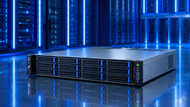
Rack servers slide into a standard 19-inch cabinet and are measured in U heights. A 1U unit takes minimal space and suits front-end roles, while 2U gives you more drive bays, more PCIe slots, and quieter, better airflow. 4U chassis exist for GPU and heavy storage builds.
Rack units stack neatly, share PDUs and switches, and keep cabling tidy. If you already run a cabinet or rent rack space, this is the default choice for most computer server deployments.
A tower server, often called a server PC, looks like a large desktop PC and works well in offices, clinics, retail back rooms, and branch sites with no rack at all. You don't need rails, cable arms, or a cabinet. Plug it in and go.
Towers run cooler at low density and tend to be quieter, which matters when the machine sits near people. They also have room inside for extra drives and cards, so a single tower can carry a small business for years. Many models can be rack-mounted later with a conversion kit.
Blade servers are compute modules that share a chassis, with power, cooling, networking, and management pooled across every blade. That's how you get high-densityservers into a small footprint.
The catch is the chassis itself. It costs real money up front, draws serious power, and locks you into one vendor's ecosystem. Blades make sense when you're filling a cabinet with dozens of nodes. They rarely make sense for a single workload.
When you compare the three, weigh physical space, power available at the socket, noise, how many machines you plan to add, and who will maintain them.
File and print serving, Active Directory, intranet apps, and shared document storage sit at the light end. Eight to 16 cores, 64GB to 128GB of RAM, and a solid RAID array cover this comfortably. Spend your money on disk capacity and a second power supply rather than CPU frequency.
Business applications like ERP or CRM front ends care more about clock speed and memory bandwidth. Collaboration tools with heavy mailbox or file sync activity push storage IOPS harder than anything else.
Hypervisor hosts are memory hungry before they are CPU hungry. Plan roughly 4GB to 8GB per virtual machine as a starting figure, add overhead for the hypervisor, then buy the next size up.
Dual socket platforms with 12 memory channels per socket give you both the lane count and the RAM ceiling for dense consolidation. Leave half your DIMM slots free if you can. Mixing workloads on one host also means you want shared storage or fast local NVMe so one noisy VM doesn't starve the rest.
Databases live and die on storage latency. NVMe drives on PCIe 5.0, plenty of RAM for buffer pools, and high clock speeds beat raw core count almost every time.
Analytics and AI training flip that. Here you need PCIe lanes for accelerators, wide memory bandwidth, and a chassis rated for 3kW or more. GPU nodes need front-to-back airflow designed for the card layout, not just any 4U box with slots.
The pattern is simple. The bottleneck in your workload decides where the money goes.
Count cores, but read past them. Current AMD EPYC and Intel Xeon families reach very high core counts at modest clock speeds, which suits virtualisation and containers. Licensing complicates this, since some software charges per core, so a 16-core part at 3.5GHz can cost less to run than a 32-core part at 2.4GHz.
Check PCIe lane count too. That number sets how many NVMe drives and network cards you can actually feed.
Capacity first, speed second. DDR5 RDIMMs at 4800 to 6400 MT/s are standard now, and MRDIMM support pushes higher on newer platforms. Populate every memory channel evenly, or you lose bandwidth for no reason.
ECC is non-negotiable in server systems. It catches and corrects single-bit errors before they corrupt data. Buy a platform with spare DIMM slots so you can double memory later without throwing away the sticks you own.
Split your thinking into capacity and speed. Nearline SAS HDDs still win on cost per terabyte for archives and backups. SATA SSDs suit general-purpose volumes. NVMe U.2, U.3, or E3.S drives handle databases and virtual machine storage.
Pick RAID with recovery time in mind. RAID 10 gives the best rebuild behaviour and write performance. RAID 6 protects against a second drive failure during a long rebuild on large disks. Check whether your controller has battery- or flash-backed cache, because write performance collapses without it.
Gigabit is no longer enough for shared storage or backup traffic. 10GbE is the sensible floor, 25GbE via SFP28 is the sweet spot for new builds, and 100GbE QSFP28 shows up on storage and cluster nodes.
Count ports as well as speed. Two ports for production, one for management, and separate links for storage or backup keep traffic from colliding. Server networking cards with RDMA support cut CPU overhead on heavy transfers.
Real performance is the slowest part of the chain. A 64-core processor paired with SATA drives will sit idle waiting on reads. Fast NVMe behind a 1GbE link will never show you its speed.
Balance the four legs: processing, memory bandwidth and capacity, storage throughput and latency, and network headroom. When you test, watch queue depths and latency rather than peak transfer numbers. Sustained behaviour under load tells the truth.
Buy a chassis with room left. Check free DIMM slots, empty drive bays, spare PCIe slots, and whether the backplane supports NVMe or only SAS/SATA. An OCP slot lets you swap network speeds later without giving up a standard PCIe slot. Confirm the power supply can carry the extra draw once those bays fill.
More users mean more sessions, more memory, and more connections, not just more CPU. Applications get heavier with every release. New projects arrive without warning. Size the platform for where you'll be in three to five years, then fill it gradually with server parts as the load grows.
Add up the real draw, not the nameplate rating. A loaded 2U dual socket node with NVMe can pull 600W to 900W. GPU nodes go far beyond that. Check the circuit, the PDU capacity, and whether you need 208V and C19 outlets rather than standard C13.
Run redundant power supplies in 1+1 for anything that can't stop. Titanium- and Platinum-rated units waste less as heat, which lowers both your electricity bill and your cooling load.
Airflow runs front to back, so keep cold aisles cold, use blanking panels in empty U space, and hold inlet temperatures in the 18°C to 27°C band. Dense racks past 15kW start needing rear door heat exchangers or liquid cooling.
Redundancy costs less than downtime. For anything the business depends on, pair the power supplies, mirror the boot devices, run ECC memory, and choose a RAID level that survives a failure during rebuild.
Hot-swap fans and drives let you fix problems without shutting down. Every serious platform ships with a baseboard management controller, iDRAC, iLO, XClarity, or similar, giving you remote console access, hardware alerts, firmware updates, and power control from anywhere. Set up email or SNMP alerts on day one. A predictive drive failure warning is worth far more than a post-mortem.
Don't pay for performance the workload will never touch. Line up the spec sheet against your measured numbers and cut what doesn't earn its place.
Look at upgrade costs before you buy. Some vendors charge heavily for their own branded memory and drives. Factor in three to five years of electricity, cooling, support contracts, and software licensing, since those numbers can pass the hardware price.
A slightly dearer chassis with room to expand often works out cheaper than replacing a full machine in year two.
For a wider view of how these parts fit together across both desktop and datacentre builds, read our PC & Servers Complete Guide: Hardware, Performance & Planning (2026). It covers component compatibility, performance tuning, upgrade paths, and long-term planning in more depth, and pairs well with this article when you're mapping out a full refresh.
A: Start with the workload, the number of concurrent users, and your current resource usage. Those three points shape the processor, memory, storage, and chassis you need. Budget and growth plans come next.
A: At least dual 10GbE ports, with 25GbE preferred on new builds. Separate management ports, RDMA support for storage traffic, and an OCP slot for future upgrades all help.
A: It depends entirely on the application. A file server with 16 cores and 64GB of RAM can serve a few hundred users comfortably, while a database serving heavy queries might strain at 50. Measure concurrent load rather than headcount.
A: Power circuit capacity, rack depth and rail compatibility, free DIMM and drive slots, backplane type, warranty length, and the cost of spare parts. Also confirm your software is certified on the platform.
A: Roughly, every watt drawn becomes a watt of heat. A 10kW rack needs matched cooling capacity and clear front-to-back airflow, with blanking panels covering space.
A: Because storage, backups, virtual machine traffic, and user sessions all share the same links. A slow network turns fast hardware into a queue.

Posted Sep 07, 2023

Posted Sep 07, 2023

Posted Sep 06, 2023

Posted Sep 05, 2023

Posted Sep 01, 2023

Posted Aug 30, 2023

Posted Aug 30, 2023