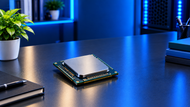
Two laptops can carry the same RAM, the same screen size, and the same price tag, yet one feels quick while the other stalls the second you open a few browser tabs.
The laptop processor is usually the reason. It sets the pace for everything the machine does, from waking up in the morning to exporting a video at midnight.
Picking a laptop processor this year is harder than it looks, because the chips no longer follow one simple pattern. Intel, AMD, Apple, and Qualcomm all mix big cores with smaller low-power cores, and two CPUs with matching core counts can behave nothing alike.
Understanding Laptop CPUs
A laptop processor, or CPU, is the chip that runs the instructions behind every app you open. It takes a task, breaks it into small steps, works through them, then hands the result back to your software. Loading a webpage, sorting a spreadsheet, applying a filter to a photo: all of it passes through the processor first.
Modern laptop processors split that work across different types of cores. Big cores take the jobs you can feel, like a game frame or a page render. Small cores quietly chew through background work such as file sync, updates, and idle tabs.
Intel's Core Ultra Series 3 chips, launched in January 2026, go a step further with a third core type that sits on a low-power section of the chip, so light tasks barely touch the battery. AMD pairs full Zen 5 cores with compact Zen 5c cores in its Ryzen AI 400 family for the same reason.
That mix is why a 16-core laptop chip can lose to a 12-core one in certain work. What the cores are, how fast they run, and how much power the laptop lets them pull all shape the result you feel.
Factors to Consider When Choosing a Laptop Processor
No single number tells you how a laptop CPU will behave. Core count without clock speed says little. Clock speed without cooling headroom is a marketing figure. Read these five together, then check them against the laptop body the chip lives in.
Factor
Why It Matters
Core Count
Sets how many jobs the chip can work through at once. Helps with rendering, code builds, and heavy multitasking.
Thread Count
Shows how many work queues the cores can juggle. Lifts speed in software written to split tasks widely.
Clock Speed
Decides how fast one core finishes one task. Shapes app responsiveness, spreadsheet math, and game frame rates.
Cache Memory
Keeps repeat data sitting right next to the cores. Large cache cuts waiting time and boosts gaming a lot.
Power Efficiency
Controls how much speed survives on battery, plus fan noise, surface heat, and sustained performance.
Core Count
Most mainstream laptop CPUs in 2026 land between 8 and 16 cores. Intel's top Core Ultra Series 3 chip runs a 4 + 8 + 4 layout for 16 cores total.
AMD's Ryzen AI 9 HX 475 sits at 12 cores. Qualcomm ships the Snapdragon X2 Elite in 12-core and 18-core versions. Extra cores stop paying off the moment your software can't use them, and everyday apps rarely stretch past a handful.
Thread Count
A thread is one queue of work a core can accept. AMD's Ryzen AI 400 chips run 12 cores with 24 threads, since each Zen 5 core takes two. Intel's Core Ultra Series 3 counts 16 cores and 16 threads, because those cores take one job each.
Apple and Qualcomm work the same single-thread-per-core way. So never rank chips from different brands by thread numbers alone.
Clock Speed
Clock speed is measured in GHz and comes in two forms: a base figure and a boost figure. AMD's Ryzen AI 9 HX 475 boosts to 5.2 GHz, and Intel's fastest Series 3 chip tops out near 5.1 GHz.
Those peaks hold only while cooling allows, which is why the same chip runs faster in a thick 16-inch laptop than in a fanless slim model. Single-core speed is what makes a machine feel snappy.
Cache Memory
Cache is small, very fast memory built into the processor for data the cores keep reusing. Its effect can be larger than core count.
AMD's Ryzen 9 9955HX3D carries 128 MB of L3 cache through stacked 3D V-Cache, and it beats Intel's 24-core Core Ultra 9 275HX in many games despite having only 16 cores. For gaming and simulation work, cache deserves a close look.
Power Efficiency
The same silicon can be set to very different power limits. AMD rates the Ryzen AI 400 range from 15 W up to 54 W, and laptop makers pick a point inside that window. Thin machines run low and stay quiet. Gaming chassis run high and get loud.
Arm-based chips such as the Snapdragon X2 Elite and Apple's M-series hold most of their speed while unplugged, which is worth real money if you work away from a socket.
Choosing a Laptop Processor Based on Your Needs
The best laptop processor is the one that fits the work you do most days, not the one at the top of a benchmark chart. Here is how the main use cases break down.
Everyday Computing and Student Use
Browsing, documents, video calls, and streaming need very little. A mid-tier chip such as a Core Ultra 5, Ryzen AI 5, or Snapdragon X2 Plus with 6 to 10 cores runs all of it without complaint. Spend the saved money on 16 GB of RAM and a better screen instead.
Business and Productivity Work
Office work rewards quick single-core speed, long battery life, and stable drivers more than raw core count. Business buyers should look at managed platforms like Intel vPro or AMD's Ryzen AI PRO 400 series, plus the ports and docking support the chip enables. A machine that lasts a full day of meetings beats one that wins a render test.
Gaming Laptops
A gaming laptop processor needs enough speed to keep the graphics card fed. HX-class chips do that, and cache-heavy options such as the Ryzen 9 9955HX3D pull ahead in CPU-bound titles. Don't pour the whole budget into the CPU, though, because the GPU decides most of your frame rate. Light and older games now run acceptably on Intel's 12-core Arc B390 integrated graphics.
Content Creation and Creative Tasks
Video editing, 3D work, and photo batches lean on cores, cache, and memory bandwidth together. Twelve cores or more with 32 GB of RAM is a sane starting point, and 32 GB matters even more on chips where the integrated GPU shares system memory. Apple's M5 remains a strong pick for editors who value quiet running and steady speed on battery.
Professional and High-Performance Workloads
Engineering simulation, data work, and large code builds need sustained power, not short bursts. Look for 55 W and higher HX-class or Ryzen AI Max processors, high thread counts, big cache, and a chassis with serious cooling. Check that your specific software is certified for the platform before buying.
Common Laptop Processor Mistakes to Avoid
The most common mistake is treating core count as a score. A 16-core chip in a thin case with a 15 W limit will lose to a 10-core chip allowed to draw 45 W, because power and cooling decide how long those cores run fast. Boost clock gets misread the same way, since it is a ceiling the laptop may only touch for seconds.
Other traps show up again and again. Buyers compare thread counts across brands that count threads differently. They trust a tier name like "Ultra 7" without checking which generation it belongs to, and model numbers from 2024 still sit on shelves.
They pair a fast CPU with 8 GB of RAM, which throttles everything. They also move to an Arm laptop without checking whether their niche software runs natively or through emulation.
Balance beats extremes. Work out what you run today, add a little headroom for two or three years, then stop. Paying for professional-grade silicon you will never load is money that belonged in storage, memory, or the display.
Why the Right Laptop Processor Matters
A laptop processor is soldered in place. You can swap RAM in some models and upgrade storage in many, but the CPU stays for the life of the machine, which for most people means three to five years.
That one choice fixes how fast your apps open, how many tabs you can keep alive, how long the battery lasts on a flight, how loud the fans get in a quiet room, and how much the laptop is worth when you sell it.
Match the chip to your actual workload and the laptop stays comfortable for years. Get it wrong, and no amount of RAM, storage, or software tuning fully fixes it. Twenty minutes spent reading a spec sheet properly is the cheapest performance upgrade you will ever buy.
Laptop chips are one branch of a much bigger family, and the same rules play out differently on desktops, mini PCs and workstations.
For the wider view on how core layouts, cache tiers, clock behaviour and power limits compare across every class of chip, read our Processors: A Guide to Choosing the Right CPU in 2026, and then come back to narrow down your shortlist..
Conclusion
Choosing a laptop processor in 2026 comes down to reading the full picture rather than one headline number.
Cores tell you how wide the chip is, threads tell you how it schedules work, clock speed tells you how quick it feels, cache tells you how little it waits, and the power limit tells you how much of that it can hold onto.
Set those five against your own workload, check the laptop body and cooling behind the chip, and pair it with enough memory. Do that, and you will pick a laptop CPU that still feels right several years from now.
Frequently Asked Questions
A: A laptop processor is the chip that carries out the instructions behind every app and system task. It sets how quickly work finishes, how much you can run at once, and how long the battery lasts. Because it cannot be replaced later, it is the single most permanent part of a laptop purchase.
A: Start with your workload, then read core count, thread count, clock speed, cache, and the power limit together. Match those to the laptop's cooling and size, since a thin machine will hold back a strong chip. Pair the CPU with at least 16 GB of RAM, or 32 GB for creative and AI work.
A: Six to eight cores cover browsing, office work, and study comfortably. Ten to sixteen cores suit gaming, photo and video editing, and heavy multitasking. Beyond sixteen cores, only professional workloads like 3D rendering, simulation, and large code builds see the benefit.
A: A core is a physical processing unit, while a thread is a stream of work a core accepts. AMD's Ryzen AI 400 cores take two threads each, giving 12 cores and 24 threads. Intel's Core Ultra Series 3 cores take one thread each, so 16 cores means 16 threads. More threads help software built to spread work widely.
A: Yes, clock speed strongly affects how responsive a laptop feels, since most everyday tasks run on one or two cores. Judge the base clock as much as the boost figure, because boost is a short peak that depends on cooling and power limits. Two chips at the same GHz can still differ, as newer designs do more work per clock cycle.
A: Avoid judging chips by core count alone, comparing thread counts across brands, and trusting boost clocks without checking the laptop's cooling. Also avoid old generations hiding behind familiar tier names, pairing a fast CPU with 8 GB of RAM, and buying professional-grade silicon for light daily work.
A: Laptop processors are built around a power and heat budget, so they run at lower sustained wattage, mix big and small cores, and are soldered to the board. Desktop processors get more power, bigger coolers, and a socket you can upgrade later. A desktop chip will beat a similarly named laptop chip in long, heavy workloads.