
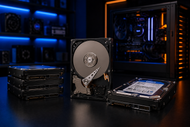
A: A 7200 RPM SATA drive in the 2TB to 4TB range is the sweet spot for most gamers. Pair it with a small SSD for your OS and top games, and you get speed plus room for a big library.
Games keep getting bigger. A single AAA title can now eat up 150GB or more, and that number climbs every year. Add your video projects, work files, backups, and a media collection on top of that, and you run out of space fast.
This is exactly why storage has become such a big topic in 2026. People want room to breathe; they want their systems to feel quick, and they don't want a drive that dies after a year.
Internal hard drives still hold a strong place in this picture. SSDs get most of the attention, but a good internal hard disk gives you loads of space for a price that makes sense.
For gamers building huge libraries and for professionals sitting on terabytes of data, the humble PC hard drive is far from dead. What matters is knowing what to look for.
Capacity, speed, and reliability all pull in different directions, and the right pick depends on how you actually use your machine.
Let's walk through everything that matters so you can buy with confidence.
Cost per terabyte is where hard drives win, plain and clear. You can grab a large internal hard disk for a fraction of what an equal-sized SSD costs. If you need 8TB or more, the price gap becomes huge.
That makes an internal hard drive the smart choice for anyone who values space over raw speed. You get more room for your money, and that money goes a long way.
Gamers collect games. That's just how it goes. A PC hard disk gives you a place to park dozens of titles without stress.
Loading times on a modern 7200 RPM drive are perfectly fine for most single-player and story-driven games. You keep your favorites installed and ready, instead of deleting and re-downloading every week.
Hard drives shine when you need to store things safely for a long time. Powered off and sitting on a shelf, a good drive holds your data for years.
That makes a computer hard drive a solid backup tool. Family photos, old projects, tax records; all of it stays put without needing constant power or attention.
The best builds in 2026 mix both drive types. You put your operating system and your most-played games on a fast SSD, then use a big internal hard drive for everything else.
This hybrid setup gives you speed where you feel it and space where you need it. You stop fighting over gigabytes and just enjoy your system.
Desktop hard drives use the 3.5-inch form factor. They run faster, hold more, and cost less per terabyte than their smaller cousins. If you have a tower PC, this is what fits your bays.
These drives are built for machines that stay plugged in and run hard, which makes them a favorite for gaming rigs and workstations.
Laptop hard drives measure 2.5 inches and sip less power. They fit the tight spaces inside notebooks and small builds.
You trade a bit of raw speed and capacity for that smaller size, but for portable machines and compact PCs, they do the job well. Many people also drop them into external cases for a quick backup drive.
Server hard drives are built to run day and night without a break. They handle heavy read and write loads and come rated for the kind of nonstop use that would wear out a normal drive.
Businesses lean on these for storage arrays, databases, and anything that simply can't go down. Reliability is the whole point here.
Big office printers and copiers often carry their own printer hard drive. It stores print jobs, scanned documents, and settings right inside the machine.
This keeps large jobs moving smoothly and holds sensitive files where the IT team can manage them. In busy offices, this small drive quietly does a lot of work.
Storage media has grown into a wide family. Alongside classic spinning drives, you have SSDs, hybrid drives, and network storage boxes.
Each one fits a different job. Knowing the full range helps you match the right tool to your needs instead of forcing one drive to do everything. A good setup often blends a few of these together.
For big-budget games, you want a drive that keeps pace. A 7200 RPM internal hard drive with a healthy cache handles most AAA titles without dragging your experience down.
While an SSD loads faster, a quick hard drive still gives smooth play once the game is running. For the price and the space, it's a strong pick for a gaming library.
Loading screens test everyone's patience. A drive with a bigger cache and faster spin cuts down that wait.
Once you're in the game, textures and level data stream in the background off your hard drive, and a good one keeps that flowing without stutters. The result is a session that feels smooth from start to finish.
Some folks keep 40, 50, even 100 games installed at once. That takes serious room. A high-capacity internal hard drive lets you build that kind of collection without hard choices.
You install what you want and jump between titles freely. For streamers and heavy players, this freedom is worth a lot.
Gamers need space first and steady speed second. A large drive paired with a small SSD covers both. Consoles benefit too, since many support internal drives or expansion bays for extra room.
The best internal hard drive for gaming and streaming gives you a big library plus reliable performance during long sessions.
Video editors, photographers, and designers deal with massive files. Raw 4K footage alone can fill a drive in days. These users want high capacity and a drive that handles big sustained transfers.
Desktop internal hard drives for gaming often suit creators too, since both crave space and steady throughput. A 6TB or larger drive keeps projects close at hand.
Offices run on documents, spreadsheets, and shared files. Internal hard drives for growing businesses give teams room to store years of records affordably.
Reliability matters most here, since downtime costs money. A dependable SATA hard drive keeps daily work moving without drama.
Data centers and large companies need drives that never quit. Enterprise-grade internal hard drives are rated for constant use and pack in huge capacity.
They form the backbone of storage arrays that hold company data safe and available around the clock. Here, trust in the drive is everything.
Storage Capacity Requirements
Start by counting what you actually store today, then add room to grow. Buying a bit more than you need now saves you from upgrading again soon.
RPM and Data Transfer Speed
Most performance drives spin at 7200 RPM. Faster spin means quicker access. For gaming and heavy work, 7200 RPM is the sweet spot. Slower 5400 RPM drives run cooler and quieter, better suited to backups.
Cache Memory Performance
Cache acts as a quick holding area for data. A bigger cache, say 128MB or 256MB, helps the drive handle bursts of activity and keeps things feeling snappy.
SATA Interface and Compatibility
Nearly all internal hard drives today use SATA connections. Check that your motherboard has a free SATA port and that your case has a bay for the drive size you're buying.
Reliability and Lifespan
Look at the warranty and the workload rating. A longer warranty usually signals a drive the maker trusts. Enterprise drives carry higher ratings for nonstop use.
A 1TB drive suits casual gamers and light users. It holds a handful of big games plus your everyday files. If you're building a budget rig or just starting out, this size gets you going without spending much.
This range hits the middle ground for most people. You get plenty of space for a growing game library, photos, and documents. Internal hard drives optimized for multitasking often land in this bracket, giving home users and small offices comfortable breathing room.
Editors, streamers, and power users want this range. Large video files, project archives, and huge libraries all fit with space to spare. These drives keep your work in one place so you're not juggling multiple disks.
Businesses storing years of data reach for the biggest drives, often 14TB and up. Reliable hard drives for business at this scale hold vast records while keeping cost per terabyte low. Paired in arrays, they store enormous amounts of company data safely.
If your drive feels sluggish, it may be full or fragmented. Free up space, run a defrag on spinning drives, and close background apps that hog the disk. Moving your most-used files to an SSD also helps a lot.
Heat shortens a drive's life. Make sure your case has decent airflow and the drive isn't crammed against other hot parts. A simple case fan aimed at the drive bays keeps temperatures in check.
When a drive won't show up, check the SATA and power cables first. Reseat them firmly. Then look in your BIOS to confirm the system sees the drive. Loose cables cause most detection headaches, and a quick reseat fixes them.
Always keep a second copy of anything you can't lose. Follow the simple rule of three copies, on two types of media, with one kept elsewhere. If a drive fails, stop using it right away to give recovery software the best shot at saving your files.
AI and Large Data Storage Demands
AI tools generate and chew through enormous datasets. This pushes demand for drives that hold more than ever, and makers are answering with bigger capacities each year.
Growth of Hybrid Storage Systems
More builds now blend SSDs and hard drives on purpose. This mix gives speed and space together, and it's becoming the standard approach for smart setups.
High-Capacity Innovations
New recording methods let drives pack more data onto each platter. Drives that once topped out around 10TB now stretch well past 20TB, and the ceiling keeps rising.
Future Gaming Storage Technologies
Games keep growing, so gaming storage grows with them. Expect larger drives, faster interfaces, and smarter caching that make big libraries feel quick and easy to manage.
Internal hard drives are just one piece of your storage setup. If you want to see how they fit alongside SSDs, external drives, network storage, and everything else, take a look at our Complete Storage Devices Guide 2026: Types, Features & Practical Uses. It ties all these options together and helps you build a setup that truly fits how you work and play.
Picking the right internal hard drive comes down to how you use your PC. Gamers want space for their library with steady speed, so a 7200 RPM drive in the 2TB to 4TB range pairs beautifully with a small SSD. Creators and businesses lean toward bigger capacities to hold their heavy files and records.
The trick is balancing three things: how much you store, how fast you need it, and what you're willing to spend.
Get that balance right, and you'll have a system that feels roomy and quick for years. In 2026, the internal hard drive still earns its place in almost every build, whether you're chasing high scores or running a business. Buy smart, plan for growth, and your storage will keep up with whatever you throw at it.
A: A 7200 RPM SATA drive in the 2TB to 4TB range is the sweet spot for most gamers. Pair it with a small SSD for your OS and top games, and you get speed plus room for a big library.
A: Count how much you store now, add room to grow, then pick your speed. Go for 7200 RPM and a large cache for gaming or work, and check that your motherboard has a free SATA port and a matching drive bay.
A: Heat, physical shock, power surges, and simple age all wear drives down. Good airflow, a surge protector, and regular backups go a long way toward keeping your data safe and your drive healthy.
A: Streamers and editors want high capacity and steady transfer speeds, so a 6TB or larger 7200 RPM drive works well. It holds your footage and recordings without forcing you to delete files mid-project.
A: Yes, spinning drives use a bit more power because they have moving parts. The difference is small for a desktop but matters more in laptops, where a 2.5-inch drive or SSD saves battery life.
A: Yes, 7200 RPM drives handle gaming well. Loading feels quick enough for most titles, and gameplay stays smooth once you're in. They're the go-to choice when you want speed and space together.
A: They're a solid choice for backups and archives. Store the drive in a cool, dry spot and keep a second copy elsewhere. For anything you truly can't lose, never rely on just one drive.

Posted Sep 07, 2023

Posted Sep 07, 2023

Posted Sep 06, 2023

Posted Sep 05, 2023

Posted Sep 01, 2023

Posted Aug 30, 2023

Posted Aug 30, 2023